$ loading▍
// products/mysql-tray-controller
Your MySQL service,
one click away.
A lightweight native Windows tray controller for MySQL and MariaDB services. See the status at a glance from a color-coded tray icon, then start, stop, or restart it without ever opening services.msc.

Platform:Windows, native
Runs as:no admin required
Footprint:a single .exe, no install needed
What it is
README.mdREADME.md
# MySQL Tray Controller
A small Rust app that sits in the Windows system tray and watches a local MySQL or MariaDB Windows service. On first launch it checks the common service names — MySQL84, MySQL80, MariaDB, wampmysqld64, and a few others — and picks the first one it finds.
Left-click or right-click the icon to open the menu and choose Running, Stopped, or Restart MySQL. Windows only asks for a UAC prompt when the service state actually changes — the tray app itself never needs administrator privileges.
Configuration lives in a plain .ini file under %APPDATA%, so pointing it at a differently-named service is a one-line edit and a "Reload configuration" click away.
Status at a glance
tray-icons.png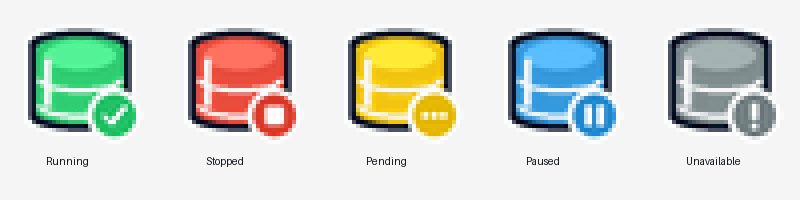
Running
the service is up
Stopped
the service is down
Pending
starting, stopping, or changing state
Paused
the service is paused
Unavailable
not found, or status unreadable
What's inside
features/Auto-detects your service
Checks the common MySQL and MariaDB service names on first launch — MySQL84, MySQL80, MariaDB, wampmysqld64, and more — so most people never touch the config.
No admin privileges to run
The tray app itself runs unelevated. Windows only shows a UAC prompt for the moment it actually starts, stops, or restarts the service.
Plain-text configuration
Service name and refresh interval live in a simple .ini file under %APPDATA%\MySQLTrayController — edit it and reload from the tray menu, no restart needed.
Optional startup with Windows
Turn it on from the tray menu and the controller launches automatically at sign-in, always watching in the background.
Stop hunting through services.msc
Unzip it, run the executable, and it sits quietly in your tray until you need it. No installer, no account, no telemetry.
MIT licensed — v1.0.1
read the docs →