MySQL was installed as a Windows service, which meant it auto-started at boot whether or not I was actually going to touch a database that session — one more background process on a machine that was already carrying enough of them.
The challenge: make it fast and painless to see whether MySQL was running and turn it off, so Windows had one less thing auto-starting and I wasn't tempted to just leave it running out of sheer inconvenience.
The manual way was the actual problem
Turning it off meant opening Run, typing services.msc, waiting for the full alphabetical list of every Windows service to load, scrolling to find whichever MySQL entry this machine had, right-clicking, Stop, confirming the UAC prompt — then doing the same in reverse the next time I actually needed the database. Small friction, repeated every single day, and the whole point was to reduce overhead — so the fix couldn't itself be a heavier thing to run.
Why a native Rust tray app
That last part ruled out the obvious shortcuts. An Electron-based tray app would mean shipping a full Chromium runtime just to show a colored icon — undercutting the entire premise of lightening the system. I built it in Rust instead: tray-icon and winit for the icon and event loop, windows-service to talk to the Windows Service Control Manager directly — the same interface services.msc uses, just without the window around it — and windows-sys for the raw Win32 bits underneath. The release profile is tuned aggressively too: link-time optimization, a single codegen unit, stripped symbols, panic = "abort" — the smallest, fastest binary it could reasonably be.
Status at a glance, control in one click
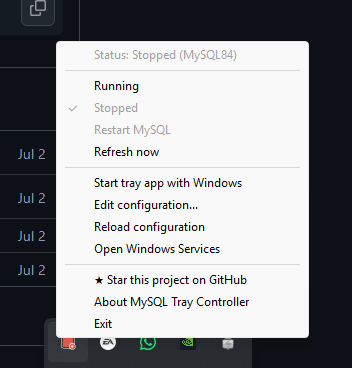
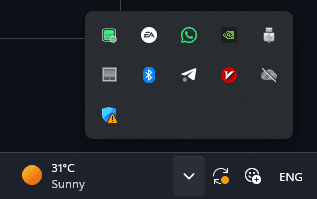
The tray icon itself carries the status — no need to open anything to know the state. It polls the service on an interval and recolors: green for running, red for stopped, amber while it's changing state, blue for paused, gray if the service can't be found at all.

Left-click or right-click the icon and the actual menu shows the current status by name, then Running, Stopped, and Restart MySQL right below it — plus a couple of shortcuts that quietly close the loop: Open Windows Services for the rare time services.msc itself is still what you need, and Star this project on GitHub for anyone who wants to say so.
Only ask for admin when it actually matters
Starting or stopping a Windows service needs elevated privileges — but running the entire tray app as administrator all the time would trade one annoyance for a worse one. Instead the app itself runs unprivileged, and Windows only pops a UAC prompt for the single moment a start, stop, or restart is actually requested. Everything else — reading status, showing the menu — needs nothing extra.
Making it forgettable
On first launch it checks the common service names on its own — MySQL84, MySQL80, MariaDB, wampmysqld64, and a few others — and just picks the first one it finds. For anything else, one line in a plain .ini file under %APPDATA% points it at the right service name. An optional start with Windows toggle means it's just there from boot, doing the one job of showing state, without asking for any attention beyond that.
Where it landed
MySQL stopped being a background mystery. A glance at the tray says whether it's running, and turning it off is one click and a UAC prompt instead of a trip through services.msc — from a binary whose entire footprint is the opposite of the "heavy background process" problem it exists to solve. It shipped as an open-source product on pumpkins.dev, with releases published on GitHub.
What I'd take from this
- If a tool's job is to lighten a system, its own footprint isn't negotiable — reach for native (Rust, in this case) over a bundled-runtime stack when small and fast is the actual requirement, not just a preference.
- Elevate only the exact action that needs it, not the whole app around it — a UAC prompt on "stop the service," not on "run this tray icon all day."
- A tool meant to fade into the background earns that by needing the least attention possible — an icon color and a startup toggle beat a dashboard, for this job.